2020-10-07 08:20:52 +08:00
Unmask For UGUI
2019-01-25 19:14:18 +08:00
===
Reverse mask for uGUI element in Unity.
2019-01-25 20:58:48 +08:00

2019-01-25 19:14:18 +08:00
2020-10-07 08:20:52 +08:00
[](https://openupm.com/packages/com.coffee.unmask/)
[](https://github.com/mob-sakai/UnmaskForUGUI/releases)
2019-01-25 19:14:18 +08:00
[](https://github.com/mob-sakai/UnmaskForUGUI/releases)
2019-01-25 19:40:45 +08:00
[](https://github.com/mob-sakai/UnmaskForUGUI/blob/upm/LICENSE.txt)
2019-01-25 19:14:18 +08:00
[](http://makeapullrequest.com)
2020-10-07 08:20:52 +08:00
[](https://twitter.com/intent/follow?screen_name=mob_sakai)
2019-01-25 19:14:18 +08:00
2020-10-07 08:20:52 +08:00





2019-01-25 19:14:18 +08:00
2020-10-07 08:20:52 +08:00
<< [Description ](#description ) | [WebGL Demo ](#demo ) | [Installation ](#installation ) | [Usage ](#usage ) | [Contributing ](#contributing ) >>
2019-01-25 19:14:18 +08:00
< br > < br > < br > < br >
2020-10-07 08:20:52 +08:00
2019-01-25 19:14:18 +08:00
## Description
Unmask provides the following features:
1. Reverse mask
2. Ray through the unmasked rectangle
3. Following another object
4. Support nesting
| Component | Features | Screenshot |
|-|-|-|
2019-01-25 19:40:45 +08:00
|**Unmask**|Reverse masking for parent Mask component.< br > < br > **Fit Target / Fit On Late Update:** Fit graphic's transform to target transform on LateUpdate.< br > **Only For Children:** Unmask affects only for children.< br > **Show Unmask Graphic:** Show the graphic that is associated with the unmask render area.|< img src = "https://user-images.githubusercontent.com/12690315/51745704-0e3e2a00-20e7-11e9-8da8-5abb1c5193bc.png" width = "600px" > |
|**UnmaskRaycastFilter**|The ray Passes through the unmasked rectangle.< br > You can click on the unmasked button on the back side.|< img src = "https://user-images.githubusercontent.com/12690315/51745958-ebf8dc00-20e7-11e9-8cfc-8174e6ab2b7c.png" width = "600px" > |
2019-01-25 19:14:18 +08:00
< br > < br > < br > < br >
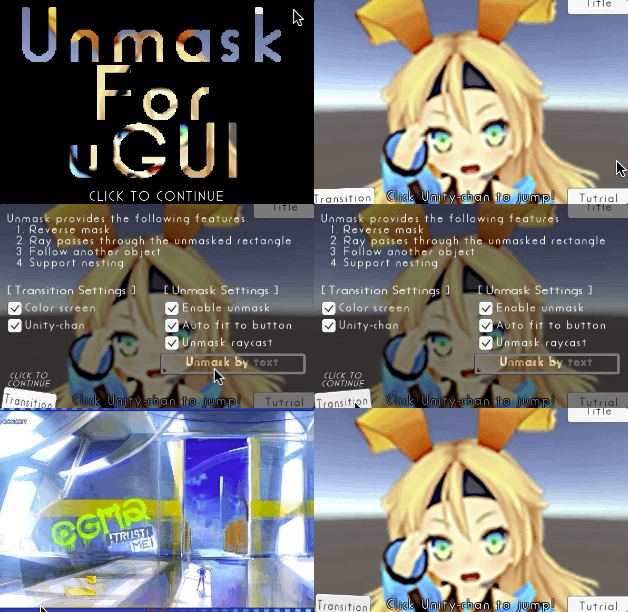
## Demo
[WebGL Demo ](http://mob-sakai.github.io/UnmaskForUGUI )
2019-01-25 19:40:45 +08:00
< br > < br > < br > < br >
2020-10-07 08:20:52 +08:00
## Installation
### Requirement
* Unity 5.5 or later
* Support 2017.x, 2018.x, 2019.x and 2020.x.
### Using OpenUPM
This package is available on [OpenUPM ](https://openupm.com ).
You can install it via [openupm-cli ](https://github.com/openupm/openupm-cli ).
```
openupm add com.coffee.unmask
```
### Using Git
2019-01-25 19:40:45 +08:00
Find the manifest.json file in the Packages folder of your project and edit it to look like this:
2020-10-07 08:20:52 +08:00
```
2019-01-25 19:40:45 +08:00
{
"dependencies": {
2020-10-07 08:20:52 +08:00
"com.coffee.unmask": "https://github.com/mob-sakai/UnmaskForUGUI.git",
2019-01-25 19:40:45 +08:00
...
},
}
```
2020-10-07 08:20:52 +08:00
To update the package, change suffix `#{version}` to the target version.
* e.g. `"com.coffee.unmask": "https://github.com/mob-sakai/UnmaskForUGUI.git#2.0.0",`
Or, use [UpmGitExtension ](https://github.com/mob-sakai/UpmGitExtension ) to install and update the package.
2019-01-25 19:40:45 +08:00
2020-10-07 08:20:52 +08:00
### For Unity 2018.2 or earlier
1. Download a source code zip file from [Releases ](https://github.com/mob-sakai/UnmaskForUGUI/releases ) page
2. Extract it
3. Import it into the following directory in your Unity project
- `Packages` (It works as an embedded package. For Unity 2018.1 or later)
- `Assets` (Legacy way. For Unity 2017.1 or later)
< br > < br > < br > < br >
## How to play demo
- For Unity 2019.1 or later
- Open `Package Manager` window and select `UI Unmask` package in package list and click `Demo > Import in project` button
- For Unity 2018.4 or earlier
- Click `Assets/Samples/UI Unmask/Import Demo` from menu
The assets will be imported into `Assets/Samples/UI Unmask/{version}/Demo` .
Open `UIUnmask_Demo` scene and play it.
2019-01-25 19:40:45 +08:00
2019-01-25 19:14:18 +08:00
< br > < br > < br > < br >
2020-10-07 08:20:52 +08:00
2019-01-25 19:14:18 +08:00
## Usage
2020-10-07 08:20:52 +08:00
### Unmask
### UnmaskRaycastFilter
2019-01-25 20:58:48 +08:00
1. Add Unmask component to the UI element (Image, RawImage, Text, etc...) under Mask, from `Add Component` in inspector or `Component > UI > Unmask > Unmask` menu.
2. If you want to unmask the area of the button, follow the steps below:
2019-01-25 19:14:18 +08:00
* Set the button to `Fit Target` in Unmask component.
* If the button moves with animation etc., enable `Fit On LateUpdate` in Unmask component.
* Add a UnmaskRaycastFilter component to UI element blocking ray.
* Set the Unmask to `Unmask` in UnmaskRaycastFilter component.
* Disable `RaycastTarget` of the UI elements, as necessary.

2020-10-07 08:20:52 +08:00
1. Enjoy!
2019-01-25 19:14:18 +08:00
< br > < br > < br > < br >
2020-10-07 08:20:52 +08:00
2019-01-25 19:14:18 +08:00
## Example of using
| Case | Description |Screenshot |
|-|-|-|
|Unmasked text|Black screen is cut out with unmasked text.||
|Hole|Black screen is cut out with unmasked Image.||
|Tutorial button|In tutorial, only specific button can be pressed.|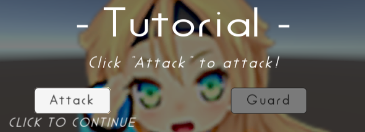|
|Transition|Transition effect with silhouette.||
< br > < br > < br > < br >
2020-10-07 08:20:52 +08:00
## Contributing
### Issues
Issues are very valuable to this project.
- Ideas are a valuable source of contributions others can make
- Problems show where this project is lacking
- With a question you show where contributors can improve the user experience
### Pull Requests
Pull requests are, a great way to get your ideas into this repository.
See [CONTRIBUTING.md ](/../../blob/upm/CONTRIBUTING.md ) and [develop ](https://github.com/mob-sakai/UnmaskForUGUI/tree/develop ) branch..
### Support
This is an open source project that I am developing in my spare time.
If you like it, please support me.
With your support, I can spend more time on development. :)
[](https://www.patreon.com/join/2343451?)
[](https://github.com/users/mob-sakai/sponsorship)
< br > < br > < br > < br >
2019-01-25 19:14:18 +08:00
## License
* MIT
* © UTJ/UCL
## Author
[mob-sakai ](https://github.com/mob-sakai )
2020-10-07 08:20:52 +08:00
[](https://twitter.com/intent/follow?screen_name=mob_sakai)
2019-01-25 19:14:18 +08:00
## See Also
* GitHub page : https://github.com/mob-sakai/UnmaskForUGUI
* Releases : https://github.com/mob-sakai/UnmaskForUGUI/releases
* Issue tracker : https://github.com/mob-sakai/UnmaskForUGUI/issues
2019-01-25 19:40:45 +08:00
* Change log : https://github.com/mob-sakai/UnmaskForUGUI/blob/upm/CHANGELOG.md

