103 lines
4.6 KiB
Markdown
103 lines
4.6 KiB
Markdown
UnmaskForUGUI
|
|
===
|
|
|
|
Reverse mask for uGUI element in Unity.
|
|
|
|

|
|
|
|
[](https://github.com/mob-sakai/UnmaskForUGUI/releases)
|
|
[](https://github.com/mob-sakai/UnmaskForUGUI/releases)
|
|

|
|
[](https://github.com/mob-sakai/UnmaskForUGUI/blob/master/LICENSE.txt)
|
|
[](http://makeapullrequest.com)
|
|
|
|
<< [Description](#Description) | [WebGL Demo](#demo) | [Download](https://github.com/mob-sakai/UnmaskForUGUI/releases) | [Usage](#usage) >>
|
|
|
|
### What's new? [See changelog ](https://github.com/mob-sakai/UnmaskForUGUI/blob/develop/CHANGELOG.md)
|
|
### Do you want to receive notifications for new releases? [Watch this repo ](https://github.com/mob-sakai/UnmaskForUGUI/subscription)
|
|
|
|
|
|
|
|
<br><br><br><br>
|
|
## Description
|
|
|
|
Unmask provides the following features:
|
|
1. Reverse mask
|
|
2. Ray through the unmasked rectangle
|
|
3. Following another object
|
|
4. Support nesting
|
|
|
|
| Component | Features | Screenshot |
|
|
|-|-|-|
|
|
|**Unmask**|Reverse masking for parent Mask component.<br><br>**Auto Fit Target:** Fit graphic's transform to target transform on LateUpdate.<br>**Show Unmask Graphic:** Show the graphic that is associated with the unmask render area.|<img src="https://user-images.githubusercontent.com/12690315/46914022-c6c9dd00-cfd2-11e8-97b7-bb5678dc3042.png" width="600px">|
|
|
|**UnmaskRaycastFilter**|The ray Passes through the unmasked rectangle.<br>You can click on the unmasked button on the back side.|<img src="https://user-images.githubusercontent.com/12690315/46914023-c6c9dd00-cfd2-11e8-9c66-985e4892cb64.png" width="600px">|
|
|
|
|
|
|
|
|
<br><br><br><br>
|
|
## Demo
|
|
|
|
[WebGL Demo](http://mob-sakai.github.io/UnmaskForUGUI)
|
|
|
|

|
|
|
|
|
|
|
|
<br><br><br><br>
|
|
## Usage
|
|
|
|
1. Download `*.unitypackage` from [Releases](https://github.com/mob-sakai/UnmaskForUGUI/releases).
|
|
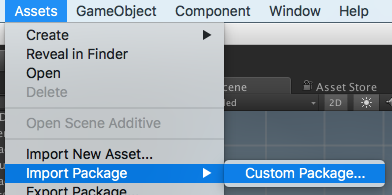
2. Import the package into your Unity project. Select `Import Package > Custom Package` from the `Assets` menu.
|
|
|
|
3. Add Unmask component to the UI element (Image, RawImage, Text, etc...) under Mask, from `Add Component` in inspector or `Component > UI > Unmask > Unmask` menu.
|
|
4. If you want to unmask the area of the button, follow the steps below:
|
|
* Set the button to `Fit Target` in Unmask component.
|
|
* If the button moves with animation etc., enable `Fit On LateUpdate` in Unmask component.
|
|
* Add a UnmaskRaycastFilter component to UI element blocking ray.
|
|
* Set the Unmask to `Unmask` in UnmaskRaycastFilter component.
|
|
* Disable `RaycastTarget` of the UI elements, as necessary.
|
|

|
|
1. Enjoy!
|
|
|
|
|
|
##### Requirement
|
|
|
|
* Unity 5.5+ *(included Unity 2018.x)*
|
|
* No other SDK are required
|
|
|
|
|
|
|
|
<br><br><br><br>
|
|
## Example of using
|
|
|
|
| Case | Description |Screenshot |
|
|
|-|-|-|
|
|
|Unmasked text|Black screen is cut out with unmasked text.||
|
|
|Hole|Black screen is cut out with unmasked Image.||
|
|
|Tutorial button|In tutorial, only specific button can be pressed.|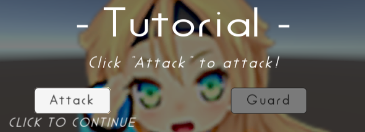|
|
|
|Transition|Transition effect with silhouette.||
|
|
|
|
|
|
|
|
<br><br><br><br>
|
|
## License
|
|
|
|
* MIT
|
|
* © UTJ/UCL
|
|
|
|
|
|
|
|
## Author
|
|
|
|
[mob-sakai](https://github.com/mob-sakai)
|
|
|
|
|
|
|
|
## See Also
|
|
|
|
* GitHub page : https://github.com/mob-sakai/UnmaskForUGUI
|
|
* Releases : https://github.com/mob-sakai/UnmaskForUGUI/releases
|
|
* Issue tracker : https://github.com/mob-sakai/UnmaskForUGUI/issues
|
|
* Current project : https://github.com/mob-sakai/UnmaskForUGUI/projects/1
|
|
* Change log : https://github.com/mob-sakai/UnmaskForUGUI/blob/master/CHANGELOG.md
|