 8b0ec8b950
# [1.2.0](https://github.com/mob-sakai/UnmaskForUGUI/compare/v1.1.3...v1.2.0) (2020-10-07) ### Bug Fixes * adapt pivot when trying to fit to target ([a39fcef]( |
||
|---|---|---|
| .github | ||
| Samples~ | ||
| Scripts | ||
| CHANGELOG.md | ||
| CHANGELOG.md.meta | ||
| LICENSE.md | ||
| LICENSE.md.meta | ||
| README.md | ||
| README.md.meta | ||
| Scripts.meta | ||
| package.json | ||
| package.json.meta | ||
README.md
Unmask For UGUI
Reverse mask for uGUI element in Unity.











<< Description | WebGL Demo | Installation | Usage | Contributing >>
Description
Unmask provides the following features:
- Reverse mask
- Ray through the unmasked rectangle
- Following another object
- Support nesting
| Component | Features | Screenshot |
|---|---|---|
| Unmask | Reverse masking for parent Mask component. Fit Target / Fit On Late Update: Fit graphic's transform to target transform on LateUpdate. Only For Children: Unmask affects only for children. Show Unmask Graphic: Show the graphic that is associated with the unmask render area. |
 |
| UnmaskRaycastFilter | The ray Passes through the unmasked rectangle. You can click on the unmasked button on the back side. |
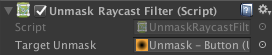 |
Demo

Installation
Requirement
- Unity 5.5 or later
- Support 2017.x, 2018.x, 2019.x and 2020.x.
Using OpenUPM
This package is available on OpenUPM.
You can install it via openupm-cli.
openupm add com.coffee.unmask
Using Git
Find the manifest.json file in the Packages folder of your project and edit it to look like this:
{
  "dependencies": {
    "com.coffee.unmask": "https://github.com/mob-sakai/UnmaskForUGUI.git",
    ...
  },
}
To update the package, change suffix #{version} to the target version.
- e.g.
"com.coffee.unmask": "https://github.com/mob-sakai/UnmaskForUGUI.git#2.0.0",
Or, use UpmGitExtension to install and update the package.
For Unity 2018.2 or earlier
- Download a source code zip file from Releases page
- Extract it
- Import it into the following directory in your Unity project
Packages(It works as an embedded package. For Unity 2018.1 or later)Assets(Legacy way. For Unity 2017.1 or later)
How to play demo
- For Unity 2019.1 or later
- Open
Package Managerwindow and selectUI Unmaskpackage in package list and clickDemo > Import in projectbutton
- Open
- For Unity 2018.4 or earlier
- Click
Assets/Samples/UI Unmask/Import Demofrom menu
- Click
The assets will be imported into Assets/Samples/UI Unmask/{version}/Demo.
Open UIUnmask_Demo scene and play it.
Usage
Unmask
UnmaskRaycastFilter
- Add Unmask component to the UI element (Image, RawImage, Text, etc...) under Mask, from
Add Componentin inspector orComponent > UI > Unmask > Unmaskmenu. - If you want to unmask the area of the button, follow the steps below:
- Set the button to
Fit Targetin Unmask component. - If the button moves with animation etc., enable
Fit On LateUpdatein Unmask component. - Add a UnmaskRaycastFilter component to UI element blocking ray.
- Set the Unmask to
Unmaskin UnmaskRaycastFilter component. - Disable
RaycastTargetof the UI elements, as necessary.

- Set the button to
- Enjoy!
Example of using
| Case | Description | Screenshot |
|---|---|---|
| Unmasked text | Black screen is cut out with unmasked text. |  |
| Hole | Black screen is cut out with unmasked Image. |  |
| Tutorial button | In tutorial, only specific button can be pressed. | 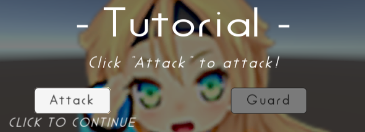 |
| Transition | Transition effect with silhouette. |  |
Contributing
Issues
Issues are very valuable to this project.
- Ideas are a valuable source of contributions others can make
- Problems show where this project is lacking
- With a question you show where contributors can improve the user experience
Pull Requests
Pull requests are, a great way to get your ideas into this repository.
See CONTRIBUTING.md and develop branch..
Support
This is an open source project that I am developing in my spare time.
If you like it, please support me.
With your support, I can spend more time on development. :)


License
- MIT
- © UTJ/UCL
Author
See Also
- GitHub page : https://github.com/mob-sakai/UnmaskForUGUI
- Releases : https://github.com/mob-sakai/UnmaskForUGUI/releases
- Issue tracker : https://github.com/mob-sakai/UnmaskForUGUI/issues
- Change log : https://github.com/mob-sakai/UnmaskForUGUI/blob/upm/CHANGELOG.md